


Genspark AI Workspace
4.6621.00 Reviews
App Specs
- Version
- 2.9.6
- Updated On
- License
- Free
- Downloads
- 1,000,000+
- Developer
- Genspark
- Categories
- Tools
- Platform
- Android
Screenshots
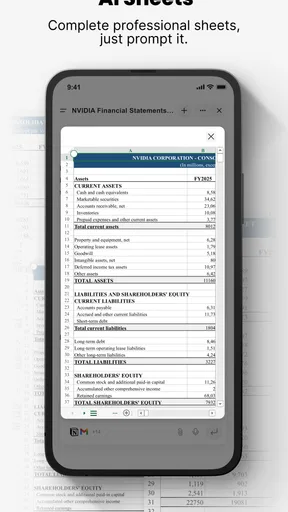
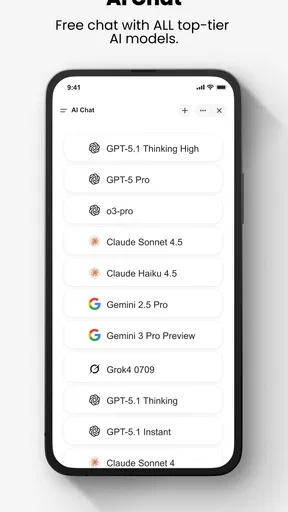
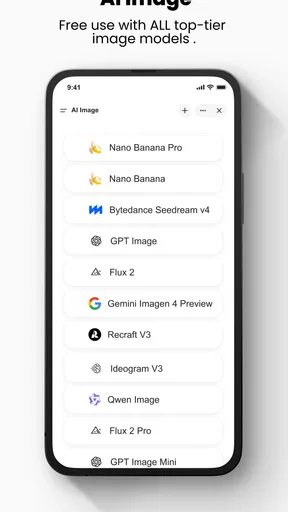
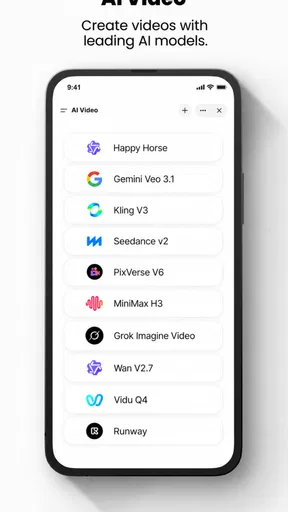
 Analysis by AppCompare
I’m cautious about adding another app to my daily routine, so I judge a productivity tool by a simple test: does it make a real piece of work easier, or does it give me another place to maintain? Genspark AI Workspace is an AI-focused tools app from Genspark that aims to take some of the busywork out of getting things done. I’d approach it as a potential hub for organizing work, not as a guaranteed replacement for every app or process I already use.
What the free starting point means
The app is free to download, which makes it possible to try it without paying upfront. It also offers in-app purchases, with listed items ranging from $19.99 to $999.99 each. That wide span is worth noticing before you commit: the existence of paid items does not, by itself, tell me which capabilities are included at each level or which purchase would suit a particular person. I’d explore the free experience first and only consider paying after identifying a specific task the paid option would improve.
For a personal organizer, the key question is whether the app reduces friction rather than adding a new subscription decision to an already crowded toolkit. If you mainly need a place to jot down reminders, a basic notes app or the task list built into a service you already use may be enough. If you want to test an AI-centered approach to everyday work, starting free is a sensible way to judge whether it fits your habits.
Where the value has to show up
For me, an AI workspace earns a place on the home screen when it helps turn a vague intention into a clear next step. Think of a Monday morning with messages to answer, a document to finish, and a meeting to prepare for. The useful outcome is not simply seeing those items together; it is leaving the app with a practical order of operations and a plan I can actually follow. That is the kind of value I would look for here, rather than assuming that AI automatically saves time.
A helpful way to evaluate it is to bring one small, real task into the app instead of migrating an entire project on day one. Try organizing a short list for a workday, or use a single shared project if you already have colleagues who can participate. Then check whether the result is clearer and easier to act on than your usual notes, calendar, or team chat. This keeps the trial low-stakes and makes it easier to tell whether the app is doing useful work or merely rearranging information.
I would also keep a human check in the loop when the task involves dates, commitments, or decisions other people rely on. AI suggestions can be a starting point, but I would not treat a proposed schedule or priority order as automatically correct. A quick review of deadlines and dependencies protects against a neat-looking plan that misses an important constraint.
Tradeoffs before you make it your hub
There is a practical tradeoff in putting several kinds of work into one workspace: fewer app switches can make a day feel calmer, but another central tool also needs to be maintained. If you keep some tasks in a calendar, others in a chat app, and still more in a separate project board, the benefit depends on whether the workspace genuinely fits into that routine. A tool that becomes one more inbox to check can create the very overhead it is meant to reduce.
Worth Reading Before You Choose

EA SPORTS FC Mobile 26 Is a Bigger Football Game, but It Takes Time

Flipboard Shows What News Apps Must Do Beyond the Feed

Switching to Android Auto Means Rethinking Your Driving Routine

Google Calendar Makes a Crowded Week Easier to Manage

Ludo King Makes the Most of the Minutes Between Plans

Baby Panda World Brings Quick Play to Modern Phones, but Its Game Library Feels Busy
I would be especially careful about moving a team’s established process all at once. People may already know where decisions, files, and project updates belong, and switching the shared routine requires agreement as well as a capable app. Test it with a contained piece of work first, agree on what belongs there, and decide how the team will handle anything that still lives elsewhere. That small trial can reveal whether a combined workspace is a better fit than simply adding another chat or task app.
There is also a difference between wanting help with organization and wanting AI to make choices on your behalf. If you prefer to set every priority manually, an AI-first workflow may feel like extra noise. If you are comfortable treating suggestions as drafts that you can revise, it may be more useful. I’d decide based on how much guidance I want, rather than assuming that more automation is always better.
Unpacking Genspark AI Workspace
First things first, let’s talk about what Genspark AI Workspace actually is. Essentially, it’s an AI-powered productivity suite designed to help you manage tasks, streamline workflows, and collaborate with your team. It’s like having a personal assistant that’s always on top of things, and honestly, who wouldn’t want that?
When you first open the app, you’re greeted with a sleek, intuitive interface. It’s user-friendly and doesn’t bombard you with too much information at once, which is a relief. You can tell they’ve put some thought into the design. Everything is easily accessible, and you can customize your dashboard to fit your preferences, which means you’re not stuck with a one-size-fits-all solution.
Features That Stand Out
Now, let’s get into the nitty-gritty of what makes this app shine. One of the standout features is the AI-driven task manager. You can input tasks, set deadlines, and prioritize them with ease. The AI even suggests the best times to tackle certain tasks based on your schedule. It’s like having a little productivity guru in your pocket.
Another cool feature is the collaboration tools. Whether you’re working remotely or in the office, keeping everyone on the same page is crucial. Genspark AI Workspace offers real-time collaboration, so you can edit documents, chat with colleagues, and share updates without switching apps. It’s seamless and efficient.
Let’s not forget about the integration capabilities. The app plays well with others, syncing effortlessly with platforms like Google Workspace, Slack, and Trello. This means you’re not starting from scratch; you can integrate it into your existing workflow without a hitch.
My Personal Experience
So, how does all this translate into real-world use? Well, I’ve been using Genspark AI Workspace for a couple of weeks now, and it’s been quite a game-changer. The AI task manager has helped me prioritize my workload better, and I find myself completing tasks more efficiently.
The collaboration features have also been a big hit with my team. We’re able to discuss ideas and track project progress without a million email threads cluttering our inboxes. Plus, the integration with other tools we already use has been a smooth transition. It’s definitely made our team dynamics more fluid.
Choosing who should try it
I think the strongest case for trying this app is for someone who regularly juggles several kinds of work and wants to see whether an AI-guided workflow helps make those demands more manageable. A freelancer, for example, might use one planning space to keep a client deadline visible alongside personal admin, while a small team could test shared updates on a project that currently sprawls across messages. The benefit is most convincing when the work has enough moving parts to justify a workspace, but not so many that a careful trial becomes disruptive.
It is less compelling if your current setup is already simple and dependable. Someone who keeps three reminders and a grocery list may get more value from a lightweight notes or checklist app than from a broader AI workspace. Likewise, if you need a specialized project-management system with a very particular process, I would compare that system’s established controls with this app before moving important work. The right choice is the one that matches the complexity of your actual routine, not the one with the most ambitious description.
A practical way to test the workflow
When I test a new organizer, I avoid copying everything into it immediately. I would start with a single workday: enter the tasks that genuinely have to happen, add their real deadlines, and check whether the suggested ordering respects fixed appointments and dependencies. If a task cannot begin until someone else replies, mark that in your own planning rather than trusting a general priority suggestion to infer it. This is a small but useful distinction: AI can help structure a list, while context still comes from the person who knows the work.
For a shared project, I would agree with colleagues on one simple rule before relying on collaboration features: where should the final decision live? A chat can be useful for discussion, while a task or document may be the better place for the settled result. That choice prevents the common problem of having several versions of the same decision scattered across tools. The app’s collaborative angle is most useful when people adopt a clear habit, not merely when everyone has access.
Integration can also be a reason to proceed gradually. If you already depend on Google Workspace, Slack, or Trello, test one connection that would remove a specific repeated step instead of linking everything at once. Keep your existing routine available until you have checked that the information you care about is appearing where you expect. A smooth connection in principle is not the same as a workflow that suits your team in practice, so I would judge it by the time and confusion it actually removes.
What to check before relying on it
Readers often want to know whether a free app means every useful part is free, whether it can replace their current tools, and whether AI suggestions can be trusted without review. My practical answer is to treat each as a separate decision. The app costs nothing to download, but paid in-app items exist; test the everyday functions you need before deciding whether any purchase makes sense. For replacing other tools, begin with one contained task rather than assuming a complete migration will be painless.
As for the suggestions, I would use them as prompts, not instructions. A proposed time for a task is only useful if it works around your real appointments, energy, and dependencies. For anything that affects a colleague or a deadline, check the plan before sharing it. That does not make AI unhelpful; it keeps the division of labor sensible, with the app assisting on organization and the user responsible for judgment.
The app is rated for Everyone, and its current version is 2.7.5. It was released on March 19, 2025, and requires Android 10 or later. It has a 4.6 average from around 35,000 ratings, with more than a million installs. Those figures suggest that many people have tried it, but they do not tell me whether its particular workflow will suit you; a short, focused test is still the fairest way to decide.
How it sits beside familiar alternatives
Compared with a basic notes app, the appeal here is the attempt to bring AI-assisted planning and team activity into a more unified workspace. Notes are often quicker for capturing an idea, though, and they can be the better choice when all you need is a searchable place to store information. Compared with a dedicated team chat, a workspace may help keep tasks and shared work closer together, but a chat tool can remain more natural for quick conversations. I would not replace either category automatically.
Against a conventional task manager, the meaningful question is whether AI guidance improves your planning enough to justify changing habits. A manual list is predictable and easy to control; AI suggestions may be useful when your workload feels crowded, but they still need a reality check. For an individual who values speed and simplicity above assistance, the familiar list may win. For someone who wants help deciding what to tackle next, a trial of Genspark’s approach is more worthwhile.
Genspark is the developer, and the app is available on Android and iOS. If you are deciding whether to install it, I would begin with the free access, pick one recurring source of busywork, and judge the result after using it in a real routine. I would not pay simply because paid options are present, nor move a whole team before a small shared trial has gone well. The practical standard is straightforward: keep it if it makes the next action clearer without creating extra upkeep.
Final Thoughts
Overall, I’d say Genspark AI Workspace is a solid choice for anyone looking to boost their productivity and enhance team collaboration. It’s packed with features that are both practical and innovative, making it a worthy addition to any professional toolkit.
While it might not be perfect for everyone, especially if you’re not a fan of AI-driven tools, it’s certainly worth giving a shot. The app is available for both Android and iOS, so you can take it for a spin no matter your device preference. Happy exploring!
Pros
- User-friendly interface for beginners.
- Customizable workspace layouts.
- Real-time collaboration tools.
- Integration with popular apps.
- Advanced AI features for automation.
Cons
- Limited offline functionality.
- Subscription required for premium features.
- Occasional lag with large files.
- Steep learning curve for advanced tools.
- Mobile version lacks some desktop features.
FAQs for Genspark AI Workspace
What features does Genspark AI Workspace offer?
Genspark AI Workspace provides a comprehensive suite of AI-driven tools designed to enhance productivity. Features include advanced text editing, real-time collaboration, project management tools, and AI-powered analytics. The app also supports integration with popular third-party applications, ensuring seamless workflow across platforms.
Is Genspark AI Workspace available on both Android and iOS devices?
Yes, Genspark AI Workspace is available for both Android and iOS platforms. It offers consistent functionality across devices, ensuring that users can access their workspace and collaborate with team members anytime and anywhere, without compromising on performance or features.
How does the pricing structure of Genspark AI Workspace work?
Genspark AI Workspace offers a tiered pricing model to accommodate different user needs. There is a free basic version with limited features, while premium versions offer enhanced capabilities. Subscription plans can be monthly or annual, with discounts available for long-term commitments and educational institutions.
What are the system requirements for Genspark AI Workspace?
To ensure optimal performance, Genspark AI Workspace requires Android 8.0 or later, or iOS 12.0 or later. The app is optimized for both smartphones and tablets, but a device with at least 2GB of RAM is recommended for smooth operation, especially when dealing with large collaborative projects.
Can Genspark AI Workspace integrate with other productivity tools?
Yes, Genspark AI Workspace supports integration with a wide range of third-party productivity tools, including cloud storage services, calendars, and communication apps. This allows users to streamline their workflow and enhance collaboration by connecting all essential tools in one centralized platform.


